Reviewing the Baby Axolotl Sublimation Bundle for Embroidery
As a designer who spends half my day digitizing and the other half stitching, I approach every new graphic asset with a healthy dose of skepticism. We have all been there: downloading a cute digital embroidery file or graphic only to realize it lacks the structural integrity needed for actual thread work. Today, I am taking a close look at the Baby Axolotl Sublimation Bundle. While this product is technically listed under Print Templates and Graphics, its potential extends far beyond simple ink-on-paper sublimation if you know how to adapt it for needle and thread.
First Impressions: Mood and Visual Personality
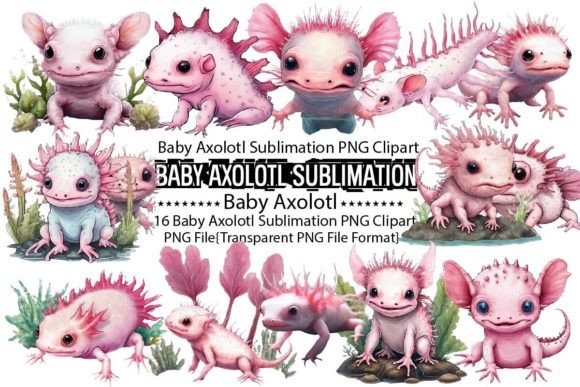
The moment I opened the folder, the mood was unmistakable. These are not stiff, vector-based cliparts; they possess a soft, watercolor aesthetic that feels organic and gentle. The Baby Axolotl Sublimation Bundle features sixteen unique designs, each rendered at 2048×2048 pixels with 300dpi resolution. For a digital artist, this resolution is standard. For an embroiderer, however, this transparency and clarity are crucial for tracing and digitizing.
The visual personality here is whimsical yet refined. The axolotls are depicted with delicate gills and expressive eyes, avoiding the overly cartoonish look that can sometimes cheapen a handmade product. This subtlety is vital. When you are creating a personalized gift, especially for a nursery or a baby shower, the design needs to feel premium, not mass-produced. The watercolor style suggests a softness that translates beautifully into thread, provided you choose the right stitch types.
From Screen to Stitch: A Real-World Scenario
To truly evaluate these assets, I imagined a specific client project: a custom sweatshirt embroidery order for a boutique children’s clothing line. The client wanted something unique, moving away from the standard block-letter names. I selected one of the simpler axolotl poses from the bundle to serve as the base for my digitization.
Because these are PNG files and not native embroidery file formats like PES or DST, the workflow requires an extra step. I imported the transparent PNG into my digitizing software. The high contrast of the black outlines against the transparent background made auto-tracing surprisingly accurate, though manual refinement was still necessary. This is where the "experienced designer" mindset kicks in. You cannot simply slap a fill stitch over a watercolor image. You must interpret the shading.
I decided to use a combination of satin stitch for the bold outlines and a light-density fill for the body, mimicking the watercolor wash. The result on the sweatshirt was charming. The texture of the thread added a tactile dimension that the original graphic lacked, elevating the finished product from a simple print to a luxury item. Customers reacting to such items often perceive higher value because of the craftsmanship involved, which directly boosts buyer engagement and trust.
Navigating Technical Constraints
While the Baby Axolotl Sublimation Bundle is visually appealing, using it for embroidery comes with caveats. Since these are graphics intended for sublimation, they do not come with pre-defined stitch paths. You are responsible for determining the stitch density and direction. If you are new to digitizing, be cautious with the detailed gills of the axolotl. In a small hoop size, such as a 4x4 inch hoop for an embroidered patch, these fine details can become a mess of thread breaks and bird nests if the stitches are too dense.
Furthermore, consider the fabric. Watercolor styles rely on subtle color blending. On a textured fabric like terry cloth or a thick fleece blanket, fine details may get lost. I recommend testing the design on scrap fabric first. Check your thread colors carefully. Since the original art uses gradients, you will need to simulate this with solid thread colors. Using variegated thread can help achieve that watercolor look without complex color changes, but it requires precise tension control.
Another critical consideration is the background. These designs have transparent backgrounds, which is excellent for layering. However, if you are stitching on dark fabric, you must ensure your outline stitches are dense enough to prevent the fabric from showing through unintentionally. A running stitch border might suffice for light fabrics, but a satin column is often safer for contrast on darker garments like navy caps or black tote bags.
Commercial Viability and Brand Consistency
For Etsy sellers and craft business owners, consistency is key. The Baby Axolotl Sublimation Bundle offers a cohesive set of sixteen designs. This allows you to create a collection rather than a single item. You could offer a matching set: a tote bag design for the mother and a smaller version for the child’s baby clothes. This bundling strategy increases the perceived value and encourages larger orders.
However, before selling any commercial embroidery items derived from these graphics, you must verify the licensing terms. The product description mentions "Creative Watercolor Clipart" and encourages following the store, but it does not explicitly state commercial rights for physical goods created after digitization. Always clarify whether the license covers derivative works. Selling a sublimated shirt is different from selling an embroidered hoodie where you have transformed the graphic into a new medium. Protect your small shop product line by ensuring you have the legal right to monetize your labor and digitization efforts.
Practical Designer Notes
If you decide to incorporate the Baby Axolotl Sublimation Bundle into your workflow, keep these practical tips in mind:
- Test on Scrap Fabric: Never run a new digitization on final customer goods. Check for puckering and thread breaks.
- Check Stabilizer: Watercolor-style fills can be heavy. Use a cut-away stabilizer for stretchy fabrics like sweatshirts to maintain shape.
- Mockup in Black and White: Before stitching, view your digitized design in grayscale. If the details disappear, your contrast is too low.
- Verify Hoop Size: Ensure the scaled design fits within your machine’s maximum hoop area, leaving room for framing.
- Inspect Small Details: Zoom in on the gills and eyes. Simplify them if they are too intricate for the thread weight you are using.
In conclusion, the Baby Axolotl Sublimation Bundle is a versatile asset for the creative entrepreneur. While it is marketed as a graphic resource, its clean lines and charming aesthetic make it an excellent foundation for custom apparel and holiday embroidery projects. With careful digitization and attention to fabric texture, you can transform these digital design assets into tangible, high-value handmade treasures that resonate with customers seeking uniqueness and quality.